 +86 18030182217
 +86 18030182217
 sandydcsplc@gmail.com


Description
Product Core Brief
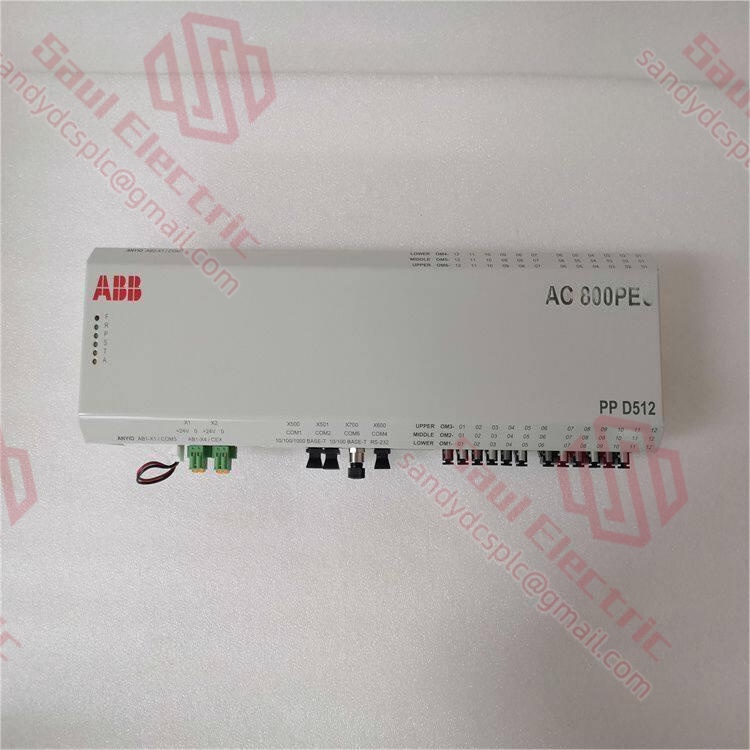
- Model: ABB PPD512 3BHE040375R1010
- Brand: ABB (Switzerland-Sweden)
- Series: ABB Excitation Control System Series
- Core Function: Excitation control unit for industrial motor and generator field regulation. Condition: New Surplus, not refurbished.
- Type: Excitation Control Module / Power Supply Unit
- Key Specs: PID Control Algorithm | Multiple I/O Channels | Industrial Communication Protocols
Key Technical Specifications
| Parameter Name | Specification Value |
|---|---|
| Model Number | PPD512 3BHE040375R1010 |
| Manufacturer | ABB |
| Product Category | Excitation Control Unit |
| Input Voltage | 24 V DC ±10% (subject to verification) |
| Control Algorithm | PID-based excitation control |
| Communication Protocol | Modbus RTU / Fieldbus (refer to manual) |
| Operating Temperature | -20°C to +60°C (typical industrial range) |
| Protection Rating | IP20 (panel mount) |
| Mounting Type | DIN Rail or Rack Mount |
| Weight | Approximately 1.5 kg |
| Dimensions | Standard industrial module form factor |
| Warranty | 1 year (supplier dependent) |
⚠️ Note: Some specifications require verification against the original ABB technical manual. Contact technical support for confirmed datasheets.
Product Introduction
The ABB PPD512 3BHE040375R1010 is an excitation control unit designed for industrial motor and generator applications. This module regulates field current to maintain stable voltage output in power generation and motor control systems. It is commonly deployed in power plants, metallurgy facilities, and petrochemical operations.As a legacy component in ABB’s excitation control lineup, the PPD512 delivers reliable performance for existing installations. Units available on the surplus market offer cost savings compared to factory-new pricing, though lead times for genuine factory parts can extend 8-12 weeks. Buyers should verify firmware versions and compatibility before deployment.
Installation & Configuration Guide
Phase 1: Pre-Installation (10 mins)
⚠️ Safety First:
- Notify production teams of planned downtime.
- Verify system is in safe state (generators offline, breakers open).
- Disconnect power to control system (including UPS backup).
- Wait 5 minutes for capacitor discharge.
Tool Checklist:
- Anti-static wrist strap + mat
- Phillips screwdriver (PH1 size)
- Multimeter (Fluke 115 or equivalent)
- Label maker + marker
- Smartphone (for photographing settings)
Backup Procedures:
- Export running configuration (save to USB + cloud storage).
- Photograph DIP switch/jumper positions (zoomed, clear shots).
- Photograph wiring terminals (every wire location and number).
- Photograph overall rack layout (prevents wrong slot installation).
Phase 2: Removal (15 mins)
Steps (DIN rail or rack mount):
- Remove front cover (if applicable): Press sides gently to release snap fittings.
- Disconnect wiring:
- Record terminal numbers for every wire (tag each one).
- Loosen terminal screws counter-clockwise.
- Pull wires gently (do not yank; terminal blocks can crack).
- Release the module:
- Locate rail latch (typically at bottom edge).
- Use flathead screwdriver to push latch down.
- Pull module straight out (perpendicular to backplane).
- Inspect backplane connectors:
- Check for bent or corroded pins.
- Use compressed air if dusty (do NOT touch pins with bare hands).
⚠️ Crucial Notes:
- Configuration stickers may exist on old modules. Photograph before removal.
- Do not use excessive force; backplane pins bend easily.
Phase 3: Installation (20 mins)
Steps:
- ESD Protection: Wear anti-static strap before removing module from bag.
- Model Verification: Confirm new model number matches old one exactly (including suffix).
- Configuration Replication (CRITICAL!):
- Using photographs, replicate DIP switch and jumper settings.
- Common settings:
- Node Address: DIP switches 1-8
- Baud Rate: 9600 / 19200 / 115200
- Termination Resistor: ON (bus end) / OFF (middle node)
- Insert into Rack:
- Align module with backplane connector (keyed slots; one-way insertion).
- Press firmly until “click” heard (latch engaged).
- Ensure module sits flush with adjacent units.
- Reconnect Wiring:
- Reinsert wires per tags/photographs.
- Tighten terminal screws clockwise (approx. 0.5 N·m torque).
- Gentle tug test on each wire.
Self-Checklist:
- DIP switches correctly set
- All cables connected securely
- Terminal screws tightened
- Module latches locked
- No loose tools in rack
Phase 4: Power-On & Testing (30 mins)
Pre-Power Checks:
- Double-check all wiring against photographs.
- Measure input voltage (should be 24 V DC ±10%).
- Check for short circuits (resistance between +24 V and GND; should be >10 kΩ).
Power-On Sequence:
- Power up control rack first (not entire plant/field devices).
- Observe Module LEDs:
- Solid Green (RUN) → Normal boot
- Flashing Red (ERR) → Refer to fault codes
- Flashing Yellow (DIAG) → Warning, but operational
- Connect Programming Software:
- Open configuration tool (ABB-specific software).
- Scan network; locate new module.
- Read module info; verify firmware version.
- Download Program:
- If identical model, download backup directly.
- If upgraded model, recompilation may be needed.
- Switch to RUN mode after download.
- Functional Testing:
- Force/toggle I/O points to check response.
- Verify communication status (HMI/SCADA connections).
- Simulate one complete control loop (e.g., excitation ramp test).
Final Sign-off:
- System runs >30 minutes without alarms.
- All monitoring parameters stable.
- Log replacement info (date, technician name, new serial number).
⚠️ Troubleshooting:
- No Comm → Check IP address, cables, switch ports.
- Solid ERR Light → Firmware mismatch; attempt correct firmware flash.
- Can’t Download Program → Check programming cable and software version compatibility.
Frequently Asked Questions (FAQ)
Q1: Is the ABB PPD512 3BHE040375R1010 still in production?A: The PPD512 series is considered a legacy product. ABB has released newer iterations in their excitation control lineup, but factory-new PPD512 units have extended lead times (8-12 weeks typically). The surplus market offers available stock, but buyers should verify authenticity. We’ve seen refurbished units sold as “new” — always request factory packing slips and serial number verification before purchase.Q2: Can I hot-swap this module without shutting down the system?A: No, hot-swapping is not supported on the PPD512. This is an excitation control unit tied directly to generator/motor field regulation. Forcing a hot-swap risks:
- Backplane connector damage from inrush current.
- Loss of excitation control during swap (potential generator trip).
- Voltage instability affecting downstream equipment.
If your operation requires zero downtime, consider a redundant excitation system design. The upfront cost is higher, but critical for continuous-process facilities.Q3: Will I lose my configuration when replacing the PPD512?A: Configuration storage depends on your system architecture:
- Scenario 1: CF Card or Non-Volatile Memory — Program loads automatically after swap.
- Scenario 2: Network-Stored Configuration — Download from engineering workstation required.
- Scenario 3: No Backup — Worst case; logic must be recreated.
My recommendation: Always export the running program before hardware replacement. I’ve seen plants lose 48 hours of production because nobody backed up the excitation parameters. Take the 10 minutes to save the file.Q4: What’s the difference between PPD512, PPD513, and other models in this series?A: These models target different performance tiers within ABB’s excitation control family:表格
| Model | Performance Tier | Memory | Redundancy Support |
|---|---|---|---|
| PPD512 | Standard | Typical | Limited |
| PPD513 | Enhanced | Expanded | Supported |
Direct interchangeability is not guaranteed. Even if physical form factors match, firmware and I/O mapping may differ. Always consult the ABB compatibility matrix before substituting models. In my experience, sticking with the exact model number avoids 90% of commissioning headaches.Q5: How do I verify this isn’t a refurbished unit sold as new?A: Several checks help identify refurbished vs. genuine new surplus:
- Packaging: Factory-sealed anti-static bags with ABB labels intact.
- Serial Number: Verify with ABB directly (they can confirm manufacture date).
- Physical Inspection: No screw marks, no yellowing on connectors, no corrosion.
- Documentation: Original packing list, warranty card, factory certificate should accompany.
- Firmware Date: Read firmware version; if it predates the supposed manufacture date, red flag.
We provide test videos and photos for customer review before shipment. If a supplier won’t share this, walk away.Q6: What firmware version should I look for?A: Firmware version requirements depend on your existing system. Before ordering:
- Read the old module’s firmware version (label or via software).
- Specify acceptable firmware range when purchasing.
- If mismatch occurs, supplier may need to flash or downgrade firmware.
Real case: I saw a project where an engineer swapped a module, and the excitation system kept reporting “Communication Timeout.” Took two days to realize firmware bumped from V2.8 to V3.1, causing a minor protocol shift. Record the version before you start.Q7: What is the warranty and return policy?A: Warranty Coverage:
- Inherent hardware faults (non-human damage).
- Functional anomalies from factory defects.
Not Covered:
- Human-caused damage (drops, water, ESD).
- Operation outside specifications (overvoltage, extreme temps).
- Force majeure (lightning, power surges).
After-Sales Process:
- Contact supplier with fault description (photos/videos ideal).
- Remote diagnostic assistance provided.
- If hardware failure confirmed:
- Within 7 days: Return/exchange.
- Within 1 year: Free replacement.
- After 1 year: Paid repair or discounted replacement.
Q8: What common mistakes should I avoid during installation?A: Five pitfalls I’ve seen repeatedly:
- DIP Switch Errors: Factory defaults rarely match site requirements. Photograph the old module before removal. I tell junior engineers: “Take a picture! Take a picture! Take a picture!”
- Termination Resistor Misconfiguration: 120 Ω resistors belong only at bus ends. Middle nodes must have termination OFF.
- Power Supply Undersizing: Calculate total rack consumption with 20% margin. An excitation system drawing extra current can trip the whole rack.
- ESD Damage: I watched an engineer touch a module without a wrist strap. Powered on — it smoked. That was $2,000 gone. Wear the strap, especially in dry conditions.
- Pinout Assumptions: Some ABB modules look identical but have different terminal assignments. Check the wiring diagram; don’t guess.
Keep these points in mind, and you’ll save yourself 90% of potential rework time.
- WhatsApp: +86 18030182217
- Email: sandydcsplc@gmail.com
- Phone: +86 18030182217
- Wechat: +86 18030182217
- Website: www.xiongbaparts.com