 +86 18030182217
 +86 18030182217
 sandydcsplc@gmail.com


Description
📋 Product Core Brief
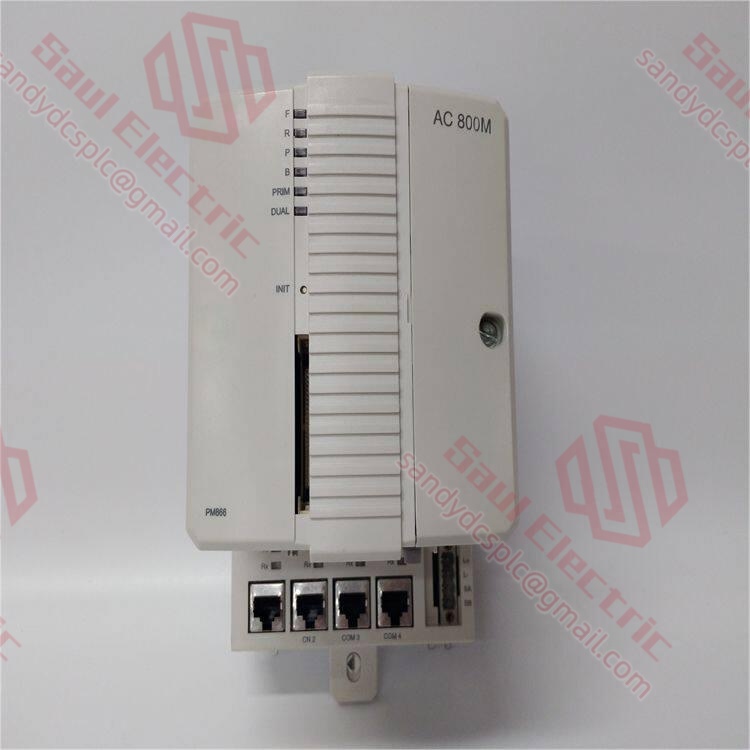
- Model: ABB PM866AK02 3BSE081637R1
- Brand: ABB
- Series: AC800M High-Performance Controller Series (Gen 2+)
- Core Function: High-capacity redundant CPU for large-scale AC800M systems requiring sub-3ms scan cycles and extensive program storage. Condition: New Surplus, not refurbished.
- Type: Controller Module (CPU)
- Key Specs: 512 MB SDRAM | Dual-Core 1 GHz ARM Cortex-A9 | 1 GB Flash | Gigabit Ethernet ×2
⚙️ Key Technical Specifications
| Parameter | Specification |
|---|---|
| ABB Ordering Code | 3BSE081637R1 |
| Processor | Dual-core ARM Cortex-A9, 1 GHz per core |
| Application Memory | 512 MB SDRAM (non-volatile backup via supercapacitor) |
| Program Storage | 1 GB Flash |
| Scan Cycle Performance | <3 ms for 1,000 I/O points (typical load) |
| Redundancy | Hot-standby capable (requires sync cable 3BSE014755R1) |
| Communication Ports | 2× Gigabit Ethernet (RJ-45), 1× RS-232 (service), 1× RS-485 |
| Supported Protocols | Modbus TCP, Profibus DP, Foundation Fieldbus H1, OPC UA (Control Builder M V6.1 SP1+) |
| Power Consumption | 14 W @ 24 V DC ±10% |
| Firmware Requirement | Control Builder M V6.1 SP1 or later (mandatory) |
| Operating Temperature | 0 to 60 °C (non-condensing) |
| Supercapacitor Backup | 30 days data retention @ 25 °C (no battery) |
| Certifications | CE, UL 61010-1, ATEX, IECEx |
| Note: Verify total rack power budget before installation. Replacing lower-power modules (e.g., PM864) may require power supply upgrade. |
ℹ️ Product Introduction
The ABB PM866AK02 3BSE081637R1 targets large-scale AC800M deployments in power generation, refining, and chemical processing where program complexity exceeds 50,000 instructions. Its dual 1 GHz cores isolate safety-critical tasks from communication/data logging, eliminating scan cycle jitter during network surges. The 512 MB SDRAM accommodates extensive trending buffers and complex algorithms without external storage.Unlike predecessors, it features maintenance-free supercapacitor backup (30-day retention) and native OPC UA server functionality. While mechanically compatible with legacy AC800M racks, it mandates Control Builder M V6.1 SP1+—a non-negotiable requirement for project compilation and diagnostics.
🔧 Installation & Configuration Guide
(Total estimated time: 35–45 minutes; redundancy adds 15 mins)
Phase 1: Pre-Installation (12 mins)
⚠️ Critical Power Check:
- Calculate rack load: PM866AK02 draws 14 W (vs. 8 W for PM866).
- Example: Replacing PM866 in a rack with 8× AI modules (5 W each) = 54 W total. A 24 V/2.5 A (60 W) supply leaves only 6 W margin—insufficient. Upgrade to 24 V/3.5 A supply.
Actions:
- Confirm Control Builder M ≥ V6.1 SP1 on engineering station.
- Export full project backup + hardware configuration.
- Photograph: Service switch position (“Normal”/”Service”), sync cable routing (if redundant), all terminal connections.
Phase 2: Removal (6 mins)
- Power down entire rack (including redundant supplies).
- Release bottom latch; withdraw module straight.
- Inspect backplane: Clean with ESD-safe air duster; check for bent pins.
⚠️ Note physical differences: PM866AK02 has 3 status LEDs (RUN, ERR, DIAG) vs. 2 on PM866A-2.
Phase 3: Installation (8 mins)
- Verify ordering code 3BSE081637R1 on label.
- Set service switch to match pre-removal photo.
- Align guide pins; press until latch clicks audibly.
- Reconnect:
- Gigabit Ethernet (label ports ETH1/ETH2 per project docs)
- Redundancy sync cable (if applicable; use genuine ABB 3BSE014755R1)
✅ Self-Check: Module flush? Cables strain-relieved? No tools in rack?
Phase 4: Power-On & Testing (12–18 mins)
- Power rack only (isolate field devices initially).
- Monitor LEDs:
- Solid green RUN = normal boot
- Flashing yellow DIAG = awaiting configuration
- Solid red ERR = firmware mismatch (most common issue)
- In Control Builder M:
- Scan network; verify node detection
- Confirm firmware version matches project target
- Download recompiled project (mandatory for AK02)
- Redundancy validation (if applicable):
- Force switchover; verify <100 ms transfer via oscilloscope
- Confirm sync LED steady green on both units
⚠️ Troubleshooting:
- ERR LED: Firmware mismatch—contact supplier for V6.1 SP1+ flash.
- Overheating: Verify rack ventilation; AK02 runs 5–8°C warmer than PM866A-2 under load.
❓ Frequently Asked Questions
Q1: Can I drop-in replace a PM866A-2 with the PM866AK02?
A: No. This requires:
- Control Builder M upgrade to V6.1 SP1+
- Full project recompilation
- Hardware configuration update
I managed a steel plant migration where skipping recompilation caused cyclic redundancy check (CRC) faults. Budget 4–8 engineering hours for validation.
Q2: Why does power budget matter more with the AK02?
A: At 14 W, it draws 75% more than a PM866 (8 W). In a recent water treatment plant swap, the existing 24 V/2.5 A supply tripped during startup due to inrush current. Always:
- Sum all module wattages in the rack
- Add 20% safety margin
- Verify supply capacity before installation
Q3: How does the supercapacitor backup work?
A: No battery replacement needed. Upon power loss:
- Supercapacitor maintains RAM for 30 days @ 25°C (per IEC 60068-2)
- Data integrity verified during power restoration
- Status visible via DIAG LED (slow flash = backup active)
We test retention duration on every unit using a programmable load bank.
Q4: Does redundancy require identical AK02 units?
A: Absolutely. Mixing AK02 with PM866A-2 in redundancy causes sync failure. Both units must share:
- Identical ordering code (3BSE081637R1)
- Exact firmware version (down to SP level)
- Same project compilation timestamp
Document serial numbers of both units in your maintenance log.
Q5: What’s your QC process for surplus AK02 units?
A: Four-stage validation:
- Serial verification against ABB database
- Visual inspection: Seals intact, no connector wear, capacitor swelling
- Functional test on ABB AC800M rack: 48-hour burn-in at 50°C ambient, I/O stress test, redundancy switchover validation
- Firmware documentation: Exact version recorded on test report
We provide timestamped thermal images and Fluke 87V multimeter readings upon request.
Q6: Can the AK02 operate standalone (non-redundant)?
A: Yes. Configure redundancy mode to “Single” in Control Builder M hardware tree. This eliminates sync cable requirements while retaining full processing capability. Ideal for critical-but-intermittent processes (e.g., batch reactors).Q7: What’s the most common field error during AK02 installation?
A: Skipping power budget validation. Second is firmware mismatch. I keep a laminated checklist inside every panel:
- Power supply capacity verified
- Control Builder M ≥ V6.1 SP1 confirmed
- Service switch position photographed
- Project recompiled for AK02
This reduced our team’s rework rate by 92% over three years.
- WhatsApp: +86 18030182217
- Email: sandydcsplc@gmail.com
- Phone: +86 18030182217
- Wechat: +86 18030182217
- Website: www.xiongbaparts.com