 +86 18030182217
 +86 18030182217
 sandydcsplc@gmail.com


Description
2. Product Core Brief
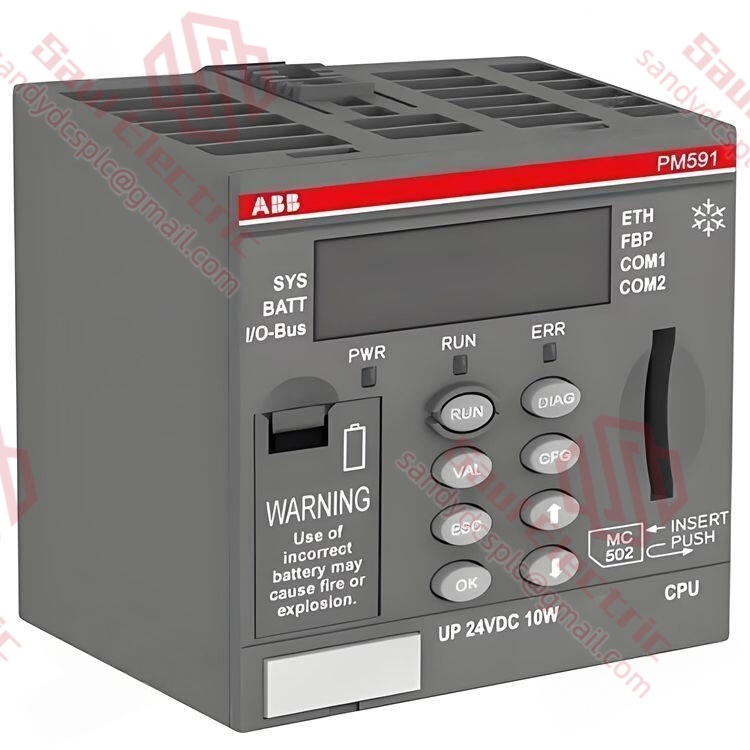
- Model: ABB PM591-ETH (1SAP150100R0270)
- Brand: ABB (Switzerland-Sweden)
- Series: AC500 Performance Controller Series
- Core Function: High-performance central processing unit for AC500 systems with dual Ethernet ports and extensive I/O expansion. Condition: New Surplus, Not Refurbished.
- Type: CPU Module (Processor)
- Key Specs: 24 V DC Supply | 2x Ethernet (RJ45) | 2 MB Program Memory | Integrated Digital I/O
3. Key Technical Specifications
表格
| Parameter Name | Specification Value |
|---|---|
| Order Number | 1SAP150100R0270 |
| Supply Voltage | 24 V DC (-20% / +25%) |
| Power Consumption | Approx. 5.5 W (at 24 V, no load) |
| Program Memory | 2 MB |
| Data Memory | 4 MB |
| Execution Speed | 0.04 µs per boolean instruction |
| Communication Ports | 2x Ethernet (RJ45, TCP/IP, Modbus TCP, PROFINET IO Device*), 1x RS-232/485 (COM1) |
| Integrated I/O | 10 Digital Inputs (24 V), 6 Digital Outputs (24 V, 0.5 A) |
| Expandable I/O | Up to 64 local/remote modules (CS31 or FBP bus) |
| Battery Backup | Supercapacitor (standard), Optional Lithium Battery (T-Batt) for extended retention |
| Mounting | DIN Rail (35 mm) |
| Operating Temperature | -20°C to +60°C (-4°F to +140°F) |
| Protection Class | IP20 |
Note: PROFINET functionality often requires specific firmware licensing or version checks.
4. Product Introduction
The ABB PM591-ETH (Order No. 1SAP150100R0270) is a high-performance central processing unit designed for the AC500 series, engineered for complex automation tasks requiring fast cycle times and extensive communication capabilities. It features dual Ethernet ports supporting standard TCP/IP and optional PROFINET IO device roles, enabling robust network integration without external switches, alongside significant program memory (2 MB) for large-scale logic.
Unlike refurbished units that may suffer from degraded supercapacitors, worn backplane connectors, or undocumented firmware flashes, our inventory consists of New Surplus modules sourced from authorized project cancellations. The “ETH” designation confirms native dual-port Ethernet capability, essential for modern distributed control architectures. We ensure every unit is factory-sealed or rigorously tested to match original performance specifications, providing a reliable, high-speed replacement for maintaining critical automotive, packaging, and water treatment infrastructure.
5. Troubleshooting Quick Reference
表格
| Symptom | Possible Cause | Part Relevance | Quick Check Method | Recommendation |
|---|---|---|---|---|
| No LEDs lit | Power supply failure or reversed polarity | ❌ Low | Measure voltage at terminal block; check polarity (+/-). | Verify 24 V DC supply is stable (>20 V); check fuse on power source. |
| RUN LED off, ERR LED red | Hardware fault, memory error, or corrupted program | ✅ High | Connect via Control Builder; read Diagnostic Buffer. | If “Watchdog Timeout” or “RAM Error” appears, replace CPU immediately. |
| Ethernet port unresponsive | IP conflict, subnet mismatch, or cable fault | ⚠️ Medium | Ping IP address; swap Ethernet cable; check switch port LEDs. | Verify IP settings match project; try the second Ethernet port (Port 2). |
| Program loss after power cycle | Supercapacitor failure or deep discharge | ⚠️ Medium | Check time since last power-up; verify if program was saved to flash. | Ensure “Retain” settings are correct; if supercapacitor fails to hold charge >24h, replace CPU. |
| PROFINET/TCP comms timeout | Device name mismatch or GSD file version issue | ⚠️ Medium | Check device name in controller vs. PLC config; verify GSD version. | Match device names exactly; update GSD files in engineering station. |
Closing Suggestion: If the above steps do not isolate the issue, we recommend contacting technical support with:
- A photo of the LED status pattern on the CPU.
- A screenshot of the error code from the Control Builder diagnostic buffer.
- The exact firmware version currently running (if accessible).
Our engineers will respond within 2 hours.
6. Frequently Asked Questions (FAQ)
Q1: What distinguishes the PM591-ETH from the lower-end PM573-ETH?
A: The PM591-ETH is part of the “Performance” tier, whereas the PM573 is “eCo” (Economical). Key differences include: Memory (2 MB vs. 512 KB), Speed (0.04 µs vs. 0.08 µs), and Expansion (supports up to 64 modules via CS31/FBP vs. only 3 local eCo modules). In my experience, the PM591 is required for complex motion control, large data handling, or systems needing PROFINET IO device capabilities, which the eCo series often lacks or limits.
A: The PM591-ETH is part of the “Performance” tier, whereas the PM573 is “eCo” (Economical). Key differences include: Memory (2 MB vs. 512 KB), Speed (0.04 µs vs. 0.08 µs), and Expansion (supports up to 64 modules via CS31/FBP vs. only 3 local eCo modules). In my experience, the PM591 is required for complex motion control, large data handling, or systems needing PROFINET IO device capabilities, which the eCo series often lacks or limits.
Q2: Is this module hot-swappable?
A: No. The PM591-ETH is the central controller; removing it while powered will stop the entire PLC process, halt all connected I/O, and likely trigger safety interlocks or machine faults. You must power down the entire rack before replacing the CPU. Attempting a live swap can damage the CS31 or FBP bus connectors on the backplane due to arcing. Plan for a scheduled downtime window of at least 45 minutes for replacement, download, and system verification.
A: No. The PM591-ETH is the central controller; removing it while powered will stop the entire PLC process, halt all connected I/O, and likely trigger safety interlocks or machine faults. You must power down the entire rack before replacing the CPU. Attempting a live swap can damage the CS31 or FBP bus connectors on the backplane due to arcing. Plan for a scheduled downtime window of at least 45 minutes for replacement, download, and system verification.
Q3: Does this CPU require a battery for data retention?
A: The PM591-ETH uses a built-in supercapacitor for short-term data retention (RAM content and real-time clock) during brief power outages (typically up to 48-72 hours depending on temperature and age). For extended storage or critical applications where power might be off for weeks, an optional lithium battery module (T-Batt) can be attached. However, best practice is to compile projects with “Download to Flash” enabled, making the system immune to supercapacitor degradation for program storage.
A: The PM591-ETH uses a built-in supercapacitor for short-term data retention (RAM content and real-time clock) during brief power outages (typically up to 48-72 hours depending on temperature and age). For extended storage or critical applications where power might be off for weeks, an optional lithium battery module (T-Batt) can be attached. However, best practice is to compile projects with “Download to Flash” enabled, making the system immune to supercapacitor degradation for program storage.
Q4: Why choose New Surplus over Refurbished for a high-end CPU like this?
A: High-performance CPUs like the PM591 generate more heat and rely heavily on stable power delivery components (capacitors/voltage regulators). Refurbished units often have unknown thermal histories; repeated heating/cooling cycles can cause solder joint fatigue or capacitor drying, leading to intermittent failures under load. New Surplus units are factory-fresh, stored in climate-controlled environments, and retain their full component lifespan. Given the critical nature of applications using the PM591, the risk of a “mystery crash” from a refurbished unit is unacceptable.
A: High-performance CPUs like the PM591 generate more heat and rely heavily on stable power delivery components (capacitors/voltage regulators). Refurbished units often have unknown thermal histories; repeated heating/cooling cycles can cause solder joint fatigue or capacitor drying, leading to intermittent failures under load. New Surplus units are factory-fresh, stored in climate-controlled environments, and retain their full component lifespan. Given the critical nature of applications using the PM591, the risk of a “mystery crash” from a refurbished unit is unacceptable.
Q5: Can I use PROFINET with this model?
A: Yes, the PM591-ETH hardware supports PROFINET IO Device functionality. However, this feature often depends on the firmware version installed. Older firmware revisions might only support standard Modbus TCP/Ethernet IP. Before purchasing for a PROFINET application, verify the firmware version on the label or ask us to check the specific batch. Upgrading firmware on-site is possible but requires a valid license and careful execution to avoid bricking the device.
A: Yes, the PM591-ETH hardware supports PROFINET IO Device functionality. However, this feature often depends on the firmware version installed. Older firmware revisions might only support standard Modbus TCP/Ethernet IP. Before purchasing for a PROFINET application, verify the firmware version on the label or ask us to check the specific batch. Upgrading firmware on-site is possible but requires a valid license and careful execution to avoid bricking the device.
Q6: What software do I need to program this?
A: You need ABB Control Builder (version compatible with AC500 Performance series). While newer versions (V6+) offer the best support, older projects might have been created in V2.x or V3.x. The PM591 generally maintains good backward compatibility, but specific library blocks or PROFINET configurations might require a minimum CB version. Always check the ABB compatibility matrix. If inheriting an old project, having the original engineering laptop or a VM with the legacy software is highly recommended.
A: You need ABB Control Builder (version compatible with AC500 Performance series). While newer versions (V6+) offer the best support, older projects might have been created in V2.x or V3.x. The PM591 generally maintains good backward compatibility, but specific library blocks or PROFINET configurations might require a minimum CB version. Always check the ABB compatibility matrix. If inheriting an old project, having the original engineering laptop or a VM with the legacy software is highly recommended.
Q7: How do I handle IP conflicts if the previous CPU had a static IP?
A: If you install a new PM591-ETH with factory default settings (often DHCP or a default static IP) into a network expecting a specific static IP, communication will fail. You have two options: 1) Use the SD card slot (if supported by firmware) to auto-load a configuration file containing the correct IP. 2) Temporarily connect your laptop directly to the CPU, assign your laptop an IP in the same subnet as the default CPU, connect via Control Builder, and change the IP to the required address before connecting to the plant network. Always document IP changes meticulously.
A: If you install a new PM591-ETH with factory default settings (often DHCP or a default static IP) into a network expecting a specific static IP, communication will fail. You have two options: 1) Use the SD card slot (if supported by firmware) to auto-load a configuration file containing the correct IP. 2) Temporarily connect your laptop directly to the CPU, assign your laptop an IP in the same subnet as the default CPU, connect via Control Builder, and change the IP to the required address before connecting to the plant network. Always document IP changes meticulously.
Contact info
- WhatsApp: +86 18030182217
- Email: sandydcsplc@gmail.com
- Phone: +86 18030182217
- Wechat: +86 18030182217
- Website: www.xiongbaparts.com