 +86 18030182217
 +86 18030182217
 sandydcsplc@gmail.com


Description
2. Product Core Brief
- Model: ABB PM511V16 (3BSE011181R1)
- Brand: ABB (Sweden)
- Series: AC500 Programmable Logic Controller (PLC) Series
- Core Function: Central processing unit for AC500 systems with integrated Ethernet and serial ports. Condition: New Surplus, Not Refurbished.
- Type: CPU Module (Processor)
- Key Specs: 24 V DC Supply | 256 KB Program Memory | Ethernet TCP/IP & RS-232/485
3. Key Technical Specifications
表格
| Parameter Name | Specification Value |
|---|---|
| Order Number | 3BSE011181R1 |
| Supply Voltage | 24 V DC (±20%) |
| Power Consumption | Approx. 3.5 W (at 24 V) |
| Program Memory | 256 KB |
| Data Memory | 512 KB |
| Execution Speed | 0.1 µs per boolean instruction |
| Communication Ports | 1x Ethernet (TCP/IP), 1x RS-232, 1x RS-485 |
| Integrated I/O | 8 Digital Inputs, 6 Digital Outputs |
| Battery Backup | Optional (T-Batt module required for real-time clock) |
| Mounting | DIN Rail or Base Plate |
| Operating Temperature | -20°C to +60°C (-4°F to +140°F) |
| Protection Class | IP20 (Front panel) |
4. Product Introduction
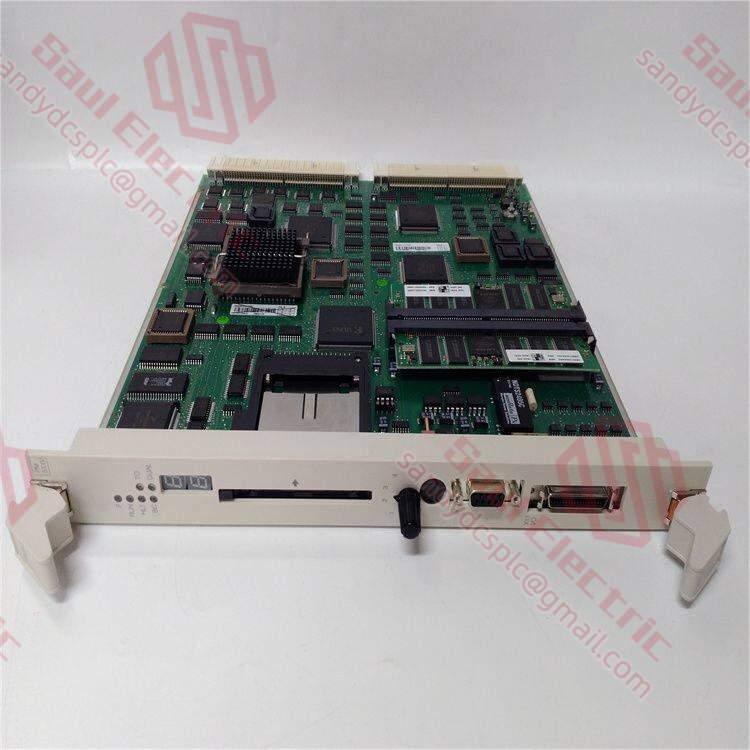
The ABB PM511V16 (Order No. 3BSE011181R1) is a compact central processing unit designed for the AC500 PLC platform, specifically engineered for small to medium-scale automation tasks. It features integrated communication interfaces including Ethernet TCP/IP and serial ports, allowing direct connection to HMIs, drives, and SCADA systems without additional communication modules.
Unlike refurbished units that may suffer from capacitor aging or undocumented firmware changes, our stock consists of New Surplus modules sourced from authorized project cancellations. The “V16” designation indicates a specific hardware revision compatible with certain legacy firmware versions; installing a newer revision without verification can cause compatibility issues in older projects. We ensure every unit is factory-sealed or rigorously tested to match original performance specifications, providing a reliable replacement for maintaining critical infrastructure.
5. Troubleshooting Quick Reference
表格
| Symptom | Possible Cause | Part Relevance | Quick Check Method | Recommendation |
|---|---|---|---|---|
| No LEDs lit | Power supply failure or reversed polarity | ❌ Low | Measure voltage at terminal block; check polarity (+/-). | Verify 24 V DC supply is stable; check fuse on power source. |
| RUN LED off, ERR LED red | Hardware fault or corrupted program | ✅ High | Connect via Control Builder; read Diagnostic Buffer. | If “Watchdog Timeout“ appears, replace CPU; if “Battery Low,“ replace battery. |
| Ethernet port unresponsive | IP conflict or cable fault | ⚠️ Medium | Ping IP address; swap Ethernet cable; check switch port. | Verify IP settings match project configuration; reset to factory defaults if needed. |
| Program loss after power cycle | Missing or dead backup battery | ⚠️ Medium | Check if T-Batt module is installed and seated correctly. | Install new lithium battery; ensure program was saved to non-volatile memory. |
| Serial comms timeout | Baud rate mismatch or wiring error | ⚠️ Medium | Check DIP switch settings for RS-485 termination; verify wiring (A/B). | Match baud rate in software to hardware settings; check shield grounding. |
Closing Suggestion: If the above steps do not isolate the issue, we recommend contacting technical support with:
- A photo of the LED status pattern on the CPU.
- A screenshot of the error code from the Control Builder diagnostic buffer.
- The exact firmware version currently running (if accessible).
Our engineers will respond within 2 hours.
6. Frequently Asked Questions (FAQ)
Q1: What does the “V16” suffix mean in PM511V16?
A: The “V16” denotes a specific hardware revision of the PM511 CPU. In the AC500 series, hardware revisions sometimes introduce minor changes to component layouts or bootloader versions. While often backward compatible, some older projects programmed with specific firmware versions may require a matching hardware revision to avoid boot errors. Always check your existing CPU label before ordering. If you are upgrading, verify firmware compatibility in the ABB migration guide.
A: The “V16” denotes a specific hardware revision of the PM511 CPU. In the AC500 series, hardware revisions sometimes introduce minor changes to component layouts or bootloader versions. While often backward compatible, some older projects programmed with specific firmware versions may require a matching hardware revision to avoid boot errors. Always check your existing CPU label before ordering. If you are upgrading, verify firmware compatibility in the ABB migration guide.
Q2: Is this module hot-swappable?
A: No. The PM511V16 is the central controller; removing it while powered will stop the entire PLC process and likely cause a machine fault or safety trip. You must power down the entire rack before replacing the CPU. In my experience, attempting a live swap can damage the backplane bus connectors due to arcing. Plan for a scheduled downtime window of at least 30 minutes for replacement and download.
A: No. The PM511V16 is the central controller; removing it while powered will stop the entire PLC process and likely cause a machine fault or safety trip. You must power down the entire rack before replacing the CPU. In my experience, attempting a live swap can damage the backplane bus connectors due to arcing. Plan for a scheduled downtime window of at least 30 minutes for replacement and download.
Q3: How do I transfer my program to the new PM511V16?
A: If your original program was saved to the SD card (if equipped) or the internal non-volatile memory, the new CPU may auto-load it upon first boot if the hardware/firmware matches exactly. However, best practice is to have the latest
A: If your original program was saved to the SD card (if equipped) or the internal non-volatile memory, the new CPU may auto-load it upon first boot if the hardware/firmware matches exactly. However, best practice is to have the latest
.proj file from your engineering station. Connect via Ethernet using Control Builder, download the full project, and perform a “Cold Start” to ensure all variables are initialized correctly. Never rely solely on automatic recovery for critical processes.Q4: Why choose New Surplus over Refurbished for a CPU?
A: CPUs contain electrolytic capacitors and real-time clock batteries that degrade over time, even on shelves. Refurbished units often have unknown storage histories; a unit sitting in a hot warehouse for 5 years may have dried-out capacitors leading to premature failure. New Surplus units are factory-fresh, typically stored in climate-controlled environments, and retain their original factory seal integrity. The risk of a “no-start” situation with a refurbished CPU far outweighs the minor cost savings.
A: CPUs contain electrolytic capacitors and real-time clock batteries that degrade over time, even on shelves. Refurbished units often have unknown storage histories; a unit sitting in a hot warehouse for 5 years may have dried-out capacitors leading to premature failure. New Surplus units are factory-fresh, typically stored in climate-controlled environments, and retain their original factory seal integrity. The risk of a “no-start” situation with a refurbished CPU far outweighs the minor cost savings.
Q5: Does this CPU support SD cards for data logging?
A: The PM511V16 has a slot for an SD memory card, which can be used for storing large data logs, recipes, or firmware updates. However, the card must be formatted correctly (usually FAT16) and inserted before powering up the module to be recognized. Note that the standard PM511 may have limitations on card size compared to newer PM5xx models; consult the manual for max capacity (typically up to 2 GB for legacy firmware).
A: The PM511V16 has a slot for an SD memory card, which can be used for storing large data logs, recipes, or firmware updates. However, the card must be formatted correctly (usually FAT16) and inserted before powering up the module to be recognized. Note that the standard PM511 may have limitations on card size compared to newer PM5xx models; consult the manual for max capacity (typically up to 2 GB for legacy firmware).
Q6: What is the warranty on this item?
A: We provide a 12-month warranty covering all inherent hardware defects. This includes failures due to manufacturing flaws or component degradation present at the time of shipping. It does not cover damage from incorrect wiring (e.g., connecting 110 V to a 24 V input), ESD damage during installation, or firmware corruption caused by user error. If a failure occurs, we offer a direct replacement within 48 hours of receiving the defective unit.
A: We provide a 12-month warranty covering all inherent hardware defects. This includes failures due to manufacturing flaws or component degradation present at the time of shipping. It does not cover damage from incorrect wiring (e.g., connecting 110 V to a 24 V input), ESD damage during installation, or firmware corruption caused by user error. If a failure occurs, we offer a direct replacement within 48 hours of receiving the defective unit.
Q7: Can I use this with the latest version of Control Builder?
A: Support depends on the specific version of Control Builder (CB) you are running. Older hardware revisions like V16 might require an older CB version (e.g., V2.x or V3.x) or a specific service pack to recognize the device fully. Newer CB versions (V5/V6) generally maintain backward compatibility but may prompt for a firmware update. Check the ABB compatibility matrix before attempting to connect to avoid accidental firmware flashing that could brick the device in a legacy system.
A: Support depends on the specific version of Control Builder (CB) you are running. Older hardware revisions like V16 might require an older CB version (e.g., V2.x or V3.x) or a specific service pack to recognize the device fully. Newer CB versions (V5/V6) generally maintain backward compatibility but may prompt for a firmware update. Check the ABB compatibility matrix before attempting to connect to avoid accidental firmware flashing that could brick the device in a legacy system.
Contact info
- WhatsApp: +86 18030182217
- Email: sandydcsplc@gmail.com
- Phone: +86 18030182217
- Wechat: +86 18030182217
- Website: www.xiongbaparts.com